
Journeys uses company-level roles to control who can access settings, navigation areas, and administrative actions across your company account.
These roles ensure that users only see and interact with the parts of the platform they have permission to use.
Overview of roles
You can also view this permission matrix in the system here: https://journeys.50skills.app/settings/users/roles
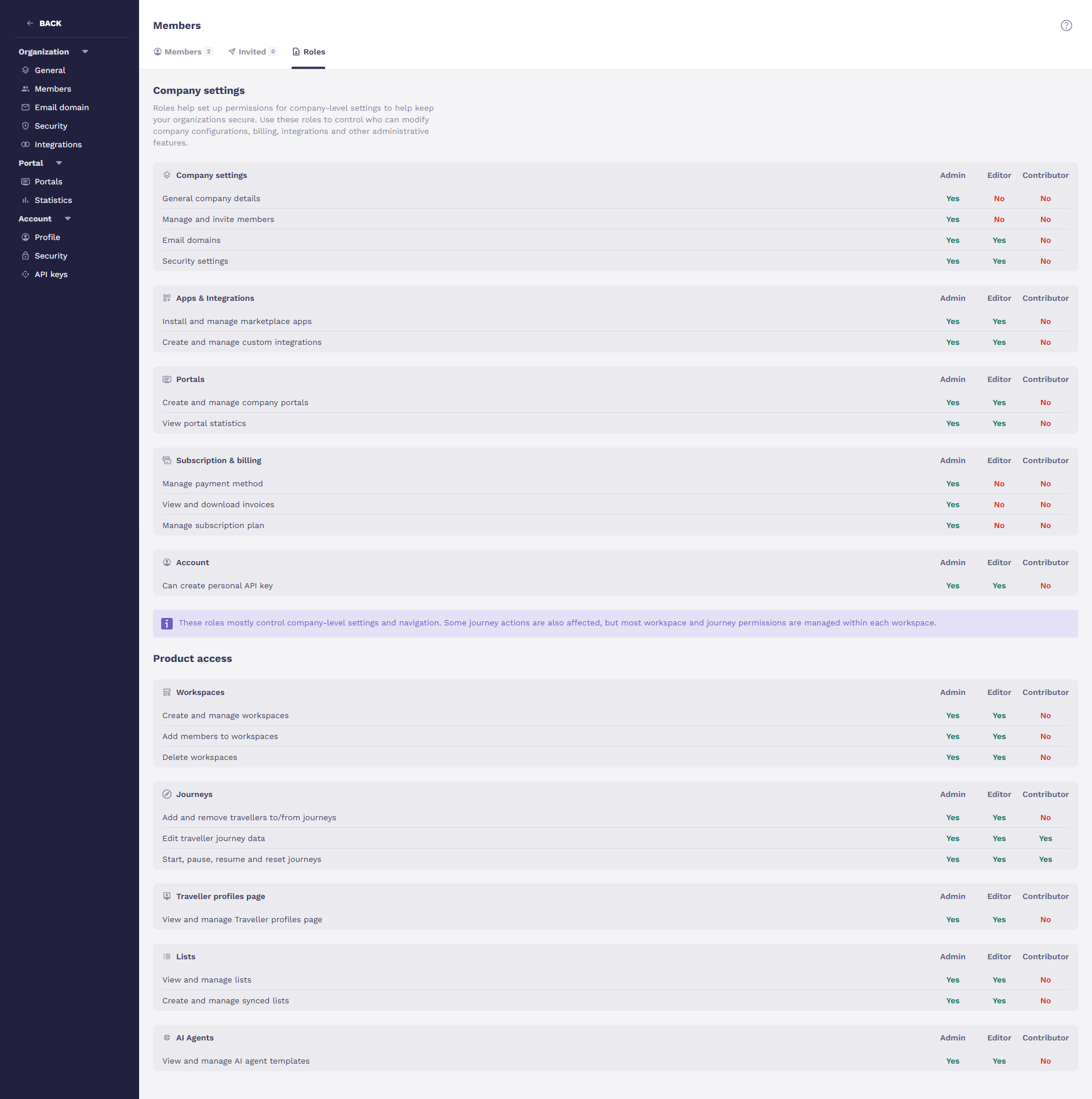
Every user in your company will have one of three roles:
Admin
Editor
Contributor
These roles control access to company settings and main navigation sections, such as Traveller Profiles, Lists, and AI Agents.
Important: Company roles do not change permissions inside individual workspaces or journeys except for that contributors cannot add or remove travellers from a journey.
Role permissions
Below is an overview of what each role can access at the company level.
Admin
Admins have full access to company-level configuration and navigation.
Admins can:
Manage all company settings
Invite and manage users
Access all main navigation sections
Manage Traveller Profiles, Lists, and AI Agents
Configure integrations
Create and manage Portals
Manage subscription and billing
Create personal API keys
Create, update, and delete workspaces
Admins cannot:
Access private workspaces or journeys they haven't been added to.
Editor
Editors can manage most operational areas of the platform but cannot modify core company or billing settings.
Editors can:
Manage Email domains
Configure Security settings
Manage Apps and integrations
Create and manage Portals
View Portal statistics
Access main navigation sections such as:
Traveller Profiles
Lists
AI Agents
Create personal API keys
Create and manage workspaces
Editors cannot:
Edit General company details
Invite or manage users
Access subscription or billing settings
Contributor
Contributors have limited access and primarily work inside journeys or workspaces.
Contributors can:
Access journeys and workspaces they are invited to
Work within those journeys depending on workspace permissions
Contributors cannot:
Access company settings
Manage integrations
Manage portals
Access billing
Create API keys
View Traveller Profiles
Access Lists
Access AI Agents
See the Settings section in the main navigation
Because contributors cannot access Traveller Profiles, they also cannot add existing travellers to a journey from the traveller list. They can only create new travellers when adding someone to a journey.
How roles affect navigation
Journeys automatically adapts the interface based on your role.
This includes:
Sidebar visibility – you only see navigation items you have permission to access
Page access protection – restricted pages cannot be opened via direct links
Action-level permissions – buttons and actions are hidden or disabled when unavailable
Workspace and journey permissions
Company roles do not automatically grant access to workspaces or journeys. Even Admins cannot access a private workspace unless they have been added to it.
However:
Admins and Editors can create, update, or delete workspaces
Role management
Only Admins can:
Invite new users
Change user roles
To prevent accidental lockouts, the system does not allow removing the last remaining Admin from a company.